Olymptrade Withdrawal: How to Withdraw Money, Methods & Processing
Writen By

Online Trading Platform Researcher and Guide Writer
Researches broker platforms and trading account Systems.
Getting funds out of a trading account can be slower than users expect when verification, payment-provider rules, or mismatched deposit/withdrawal routes create holds. Confirming your account status, the allowed payout destinations for your country, and any return-of-funds requirements before you submit a request reduces the chance of delays or rejections and helps you choose the fastest, compliant method for your situation.
Below you’ll find a practical withdrawal workflow for Olymptrade that covers available payout types, typical processing windows, common reasons for holds, and simple troubleshooting steps to follow if a cashout stalls. The guidance focuses on eligibility checks, required documents, tracking a pending request, and safe practices so you can recover funds or escalate an unresolved payout efficiently.
Below you’ll find a practical withdrawal workflow for Olymptrade that covers available payout types, typical processing windows, common reasons for holds, and simple troubleshooting steps to follow if a cashout stalls. The guidance focuses on eligibility checks, required documents, tracking a pending request, and safe practices so you can recover funds or escalate an unresolved payout efficiently.

What Payment Methods Can I Withdraw Funds To?
You can only withdraw funds to your payment method.If you have made a deposit using 2 payment methods, a withdrawal to each of them should be proportional to the payment amounts.
Do I Need to Provide Documents to Withdraw Funds?
There’s no need to provide anything in advance, you will only have to upload documents upon request. This procedure provides additional security for the funds in your deposit.If your account needs to be verified, you will receive an instruction on how to do it by email.
How do I Withdraw Money
Withdrawal using Mobile Device
Go to your platform user account and select "More"
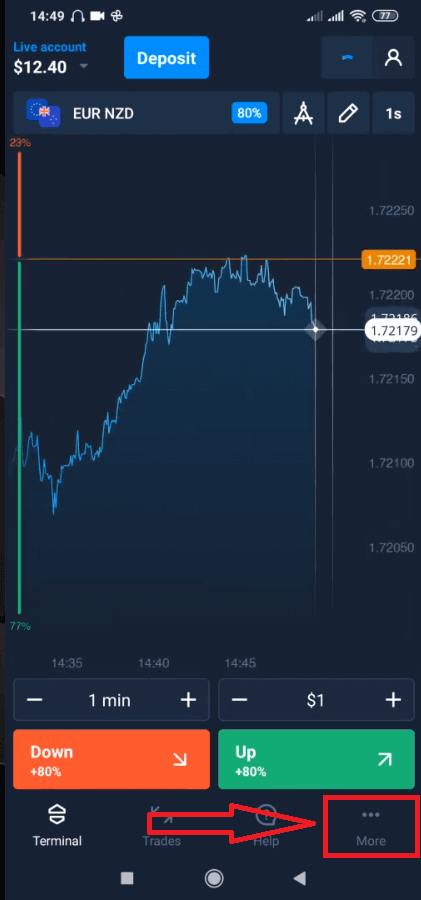
Select "Withdraw".
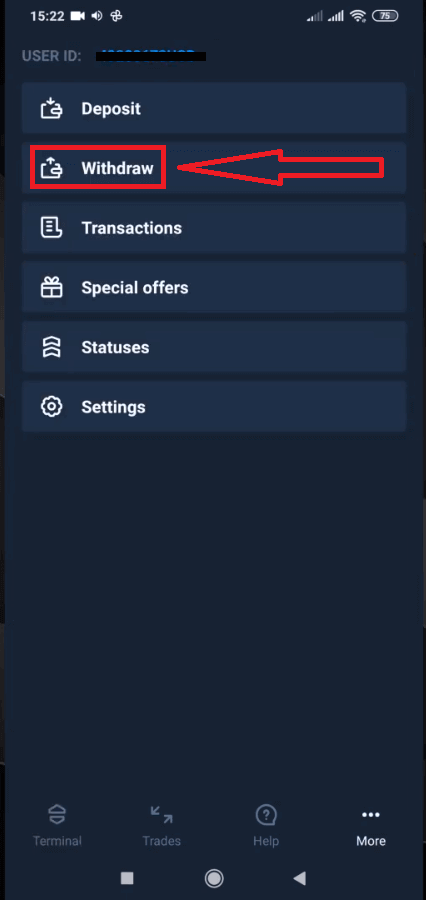
It will lead you to a special section on the Olymptrade website.
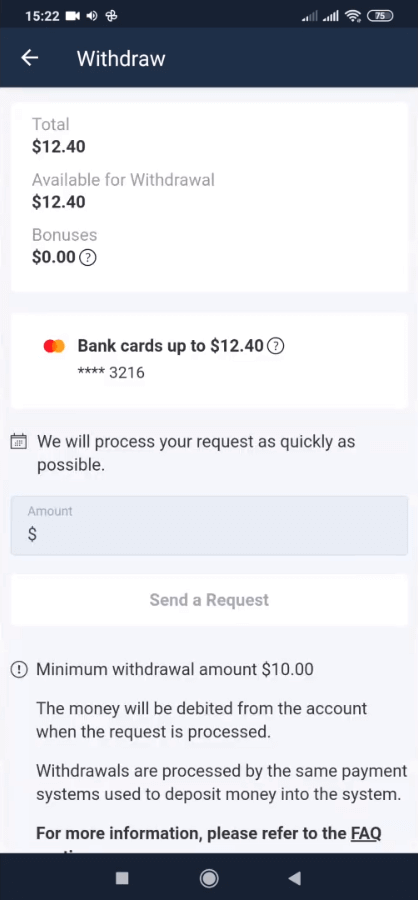
In the “Available for withdrawal” block you will find the information about how much you can withdraw.
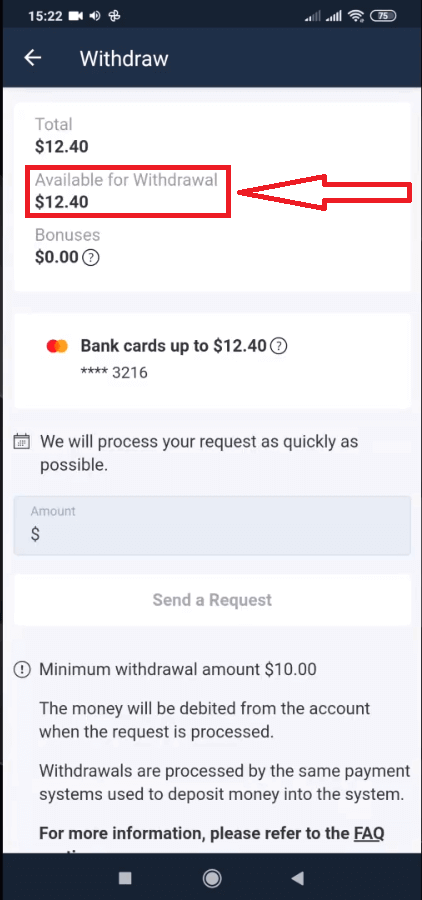
Select the amount. The minimum withdrawal amount is $10/€10/R$50, but it may vary for different payment systems. Click “Send a Request”
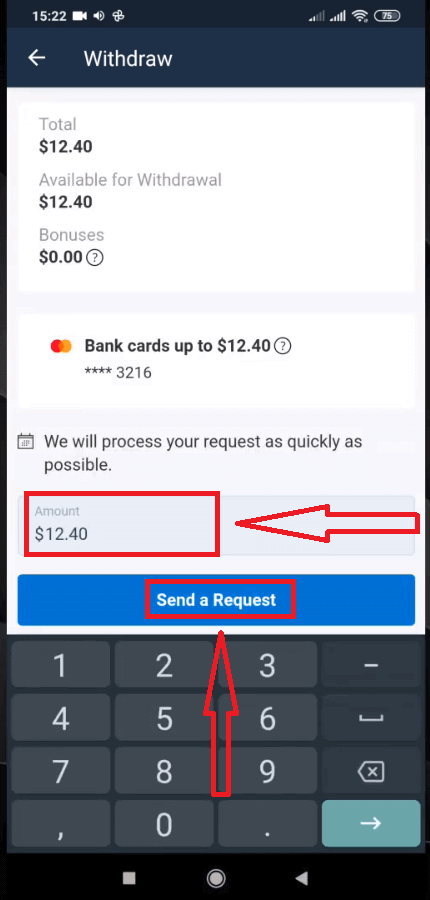
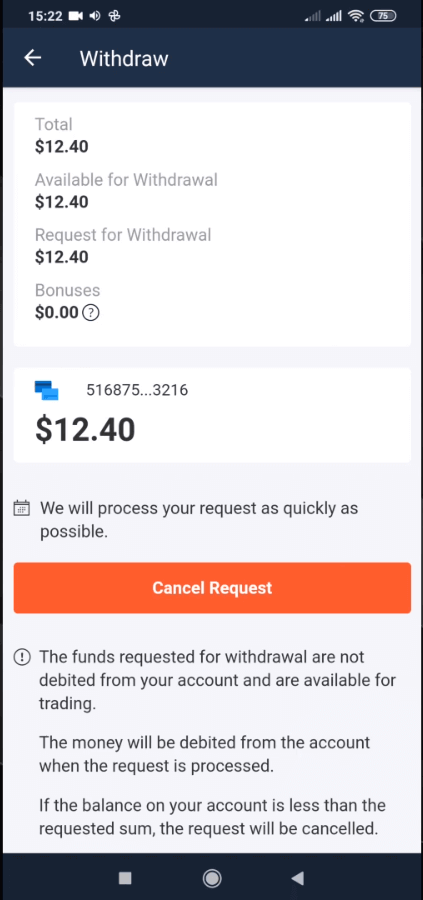
Wait a few seconds, you will see your request.
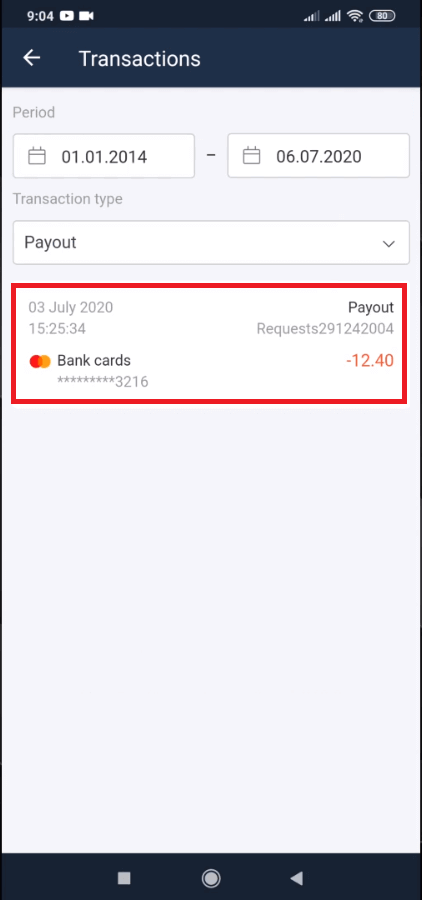
Check your payment in Transactions
Withdrawal using Desktop
Go to your platform user account and click "Payments" button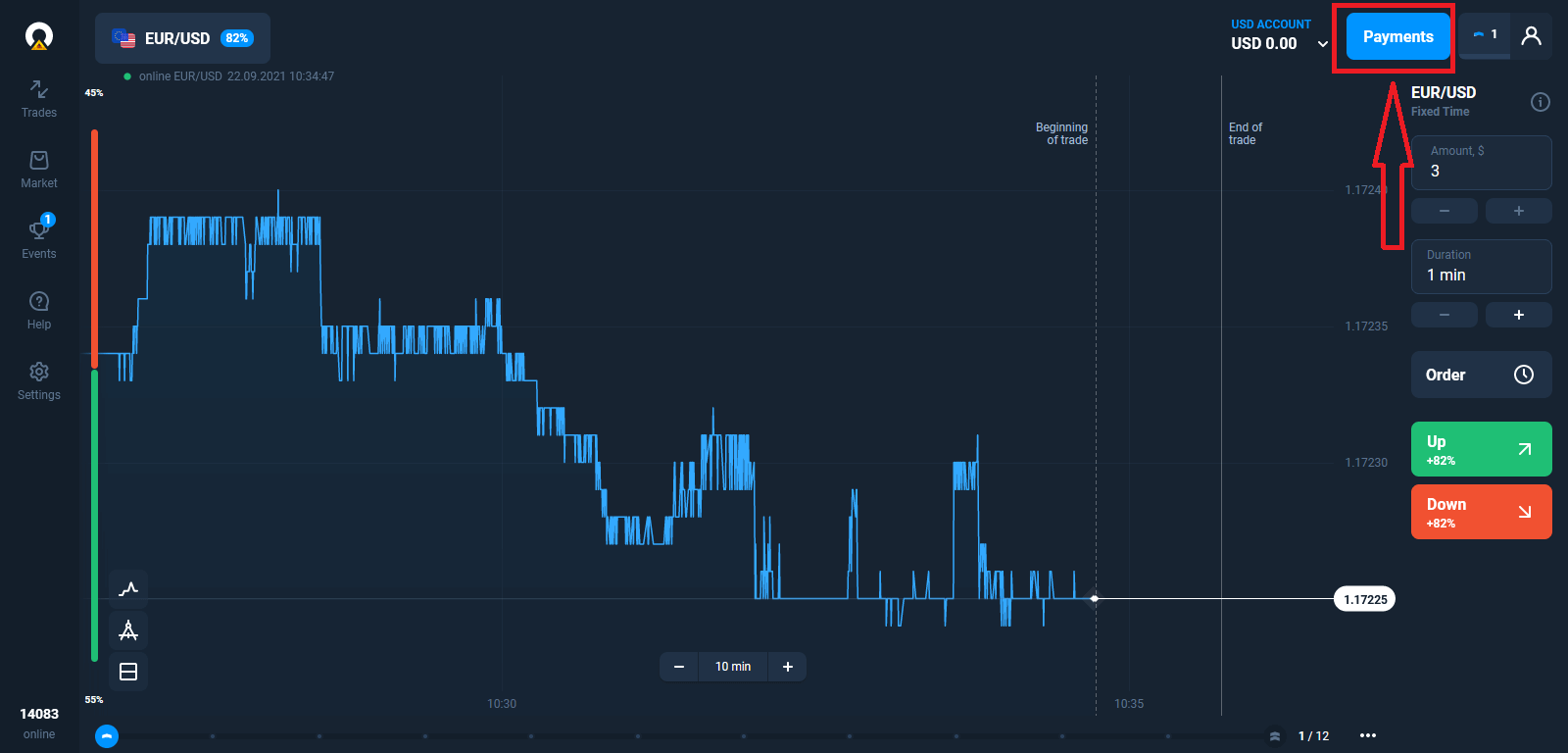
Select “Withdraw”.
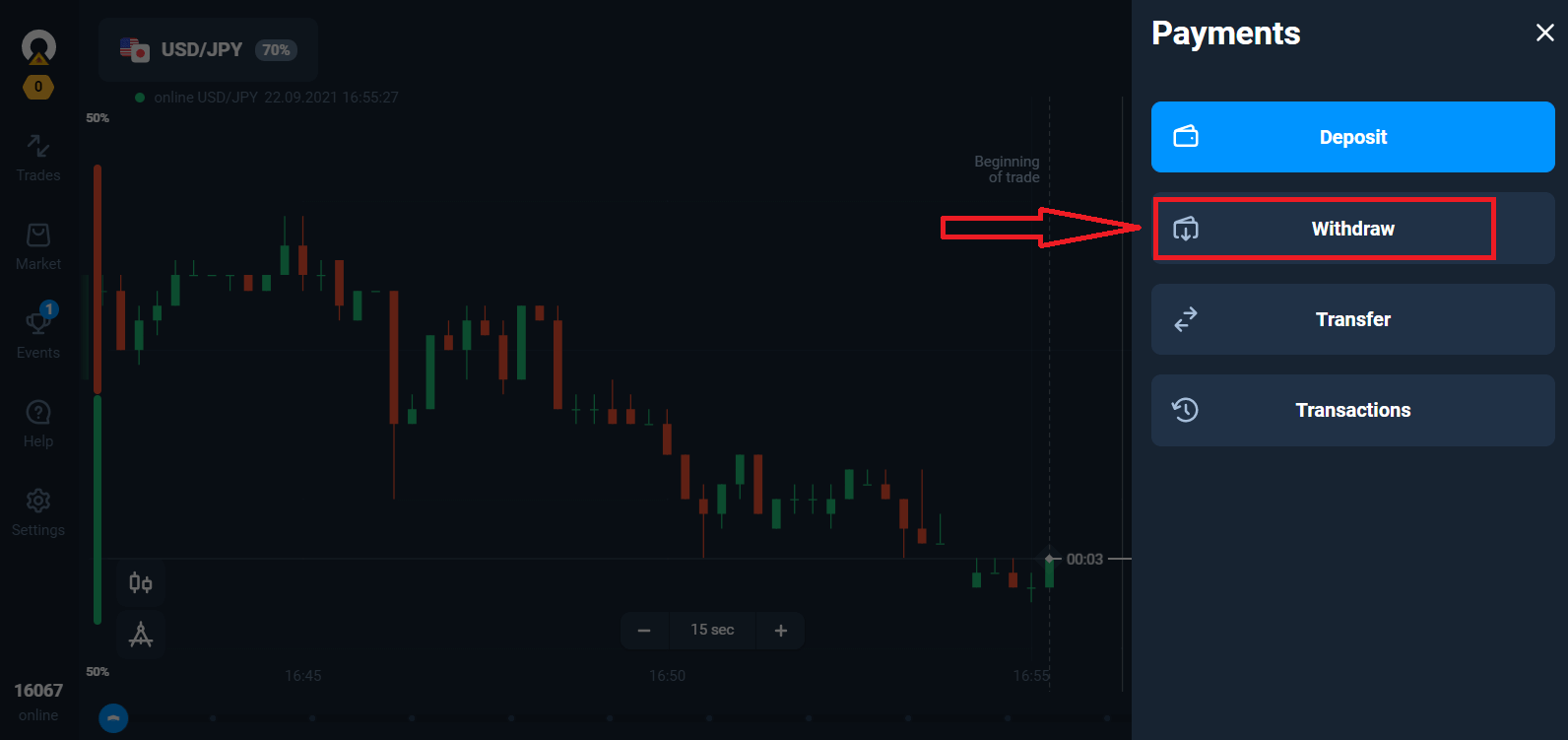
It will lead you to a special section on the Olymptrade website.
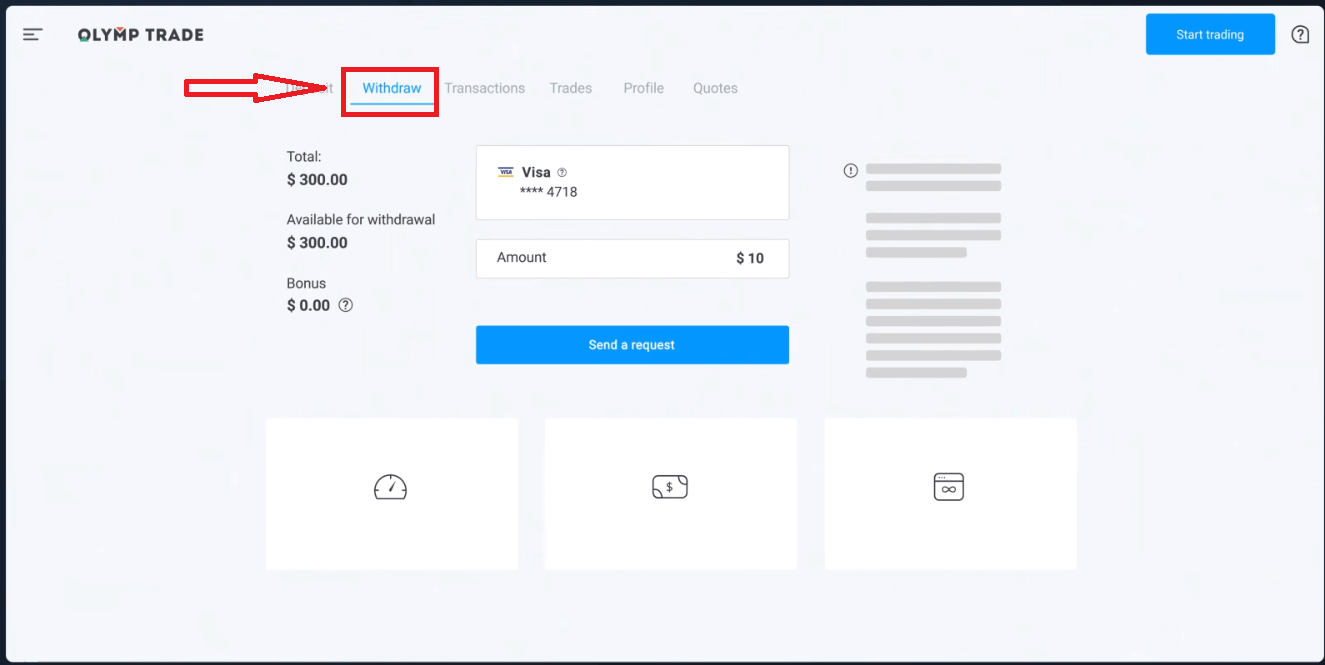
In the “Available for withdrawal” block you will find the information about how much you can withdraw.
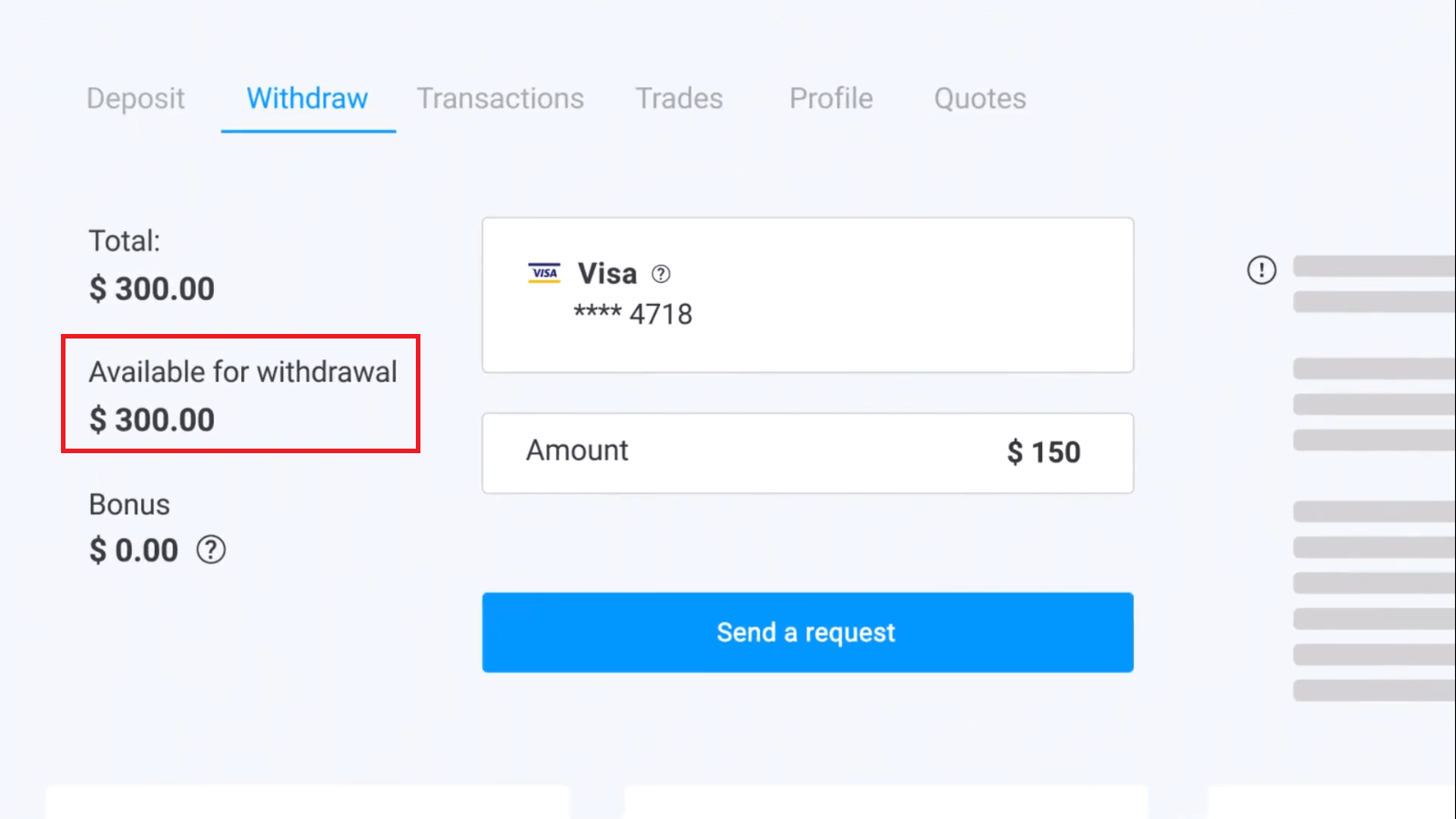
Select the amount. The minimum withdrawal amount is $10/€10/R$50, but it may vary for different payment systems. Click “Send a Request”.
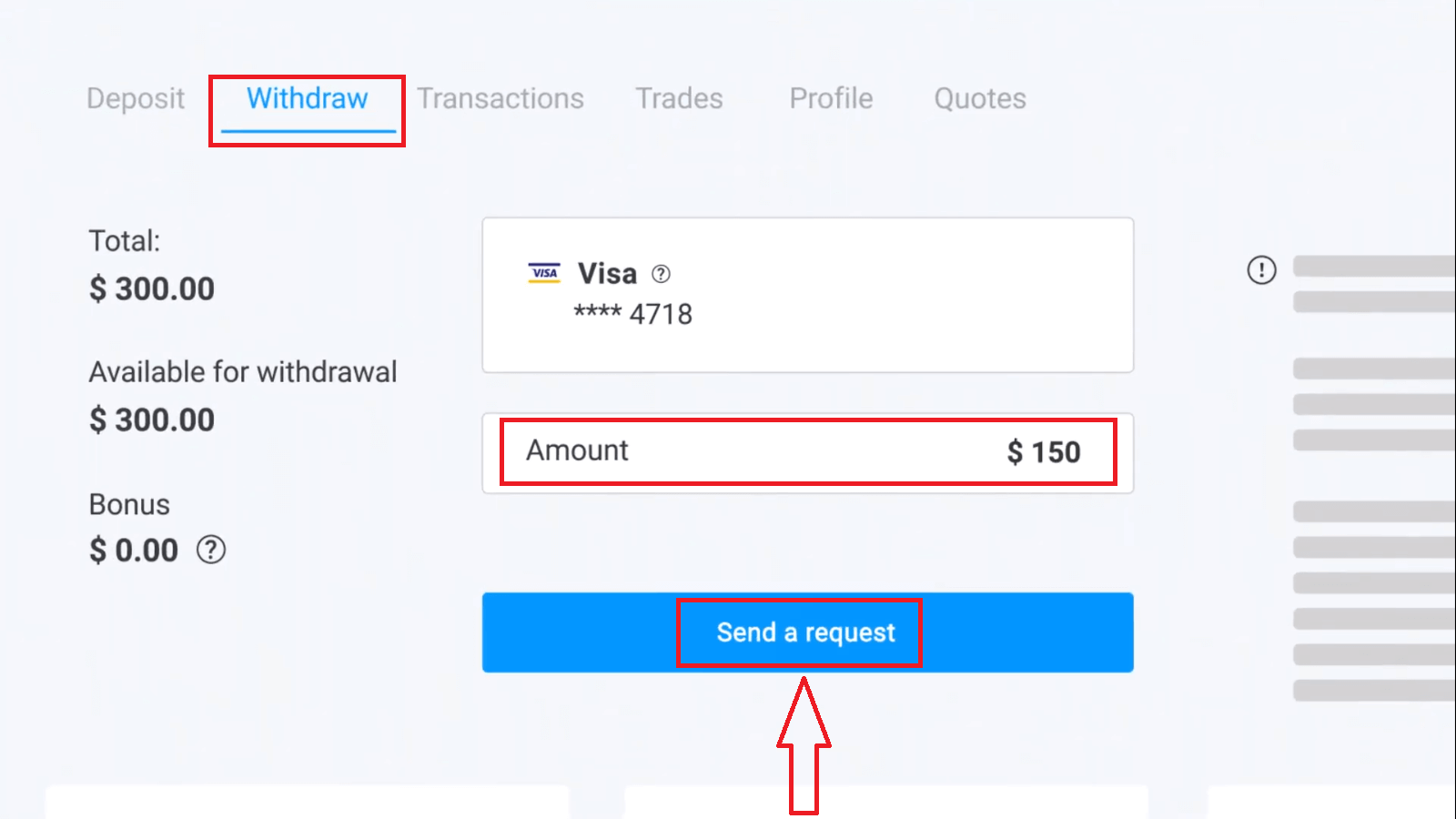
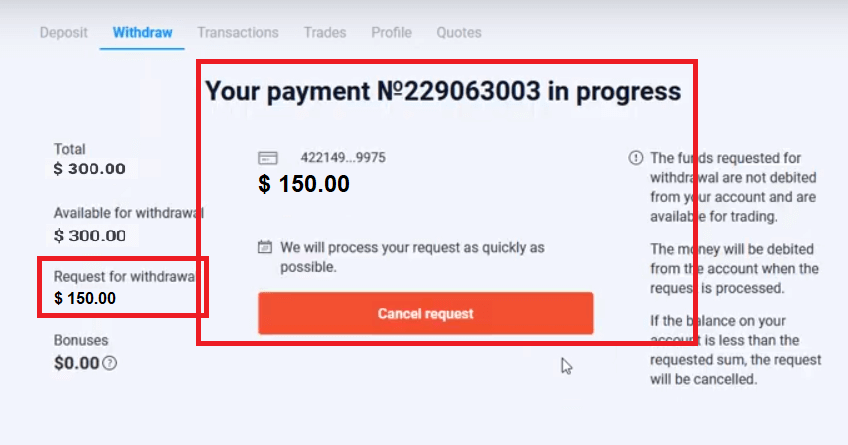
Wait a few seconds, you will see your payment.
Frequently Asked Questions (FAQ)
What Should I Do If the Bank Rejects My Withdrawal Request?
Don’t worry, we can see that your request has been rejected. Unfortunately, the bank doesn’t provide the reason for the rejection. We will send you an email describing what to do in this case.Why Do I Receive the Requested Amount in Parts?
This situation may arise because of the payment systems’ operational features.You have requested a withdrawal, and you only got part of the requested amount transferred to your card or e-wallet. The withdrawal request status is still “In process”.
Don’t worry. Some banks and payment systems have restrictions on the maximum payout, so a larger amount can be credited to the account in smaller parts.
You will receive the requested amount in full, but the funds will be transferred in a few steps.
Please note: you can only make a new withdrawal request after the previous one has been processed. One cannot make several withdrawal requests at once.
Funds Withdrawal Cancellation
It takes some time to process a withdrawal request. The funds for trading will be available within this entire period.However, if you have less funds in your account than you have requested to withdraw, the withdrawal request will be cancelled automatically.
Besides, сlients themselves can cancel withdrawal requestes by going to the "Transactions" menu of the user account and cancelling the request.
How Long Do You Process Withdrawal Requests
We are doing our best to process all our clients requests as fast as possible. However, it may take from 2 to 5 business days to withdraw the funds. The duration of the request processing depends on the payment method you use.When Are the Funds Debited from the Account?
Funds are debited from the trading account once a withdrawal request is processed.If your withdrawal request is being processed in parts, the funds will be also debited from your account in parts.
Why Do You Credit a Deposit Straight off but Take Time to Process a Withdrawal?
When you top up, we process the request and credit the funds to your account straight off.Your withdrawal request is processed by the platform and your bank or payment system. It takes more time to complete the request due to an increase of counterparties in the chain. Besides, each payment system has own withdrawal processing period.
On average, funds are credited to a bank card within 2 business days. However, it may take some banks up to 30 days to transfer the funds.
E-wallet holders receive the money once the request is processed by the platform.
Don’t worry if you see the status saying “Payout has been successfully made” in your account but you haven’t received your funds.
It means that we have sent the funds and the withdrawal request is now processed by your bank or payment system. The speed of this process is out of our control.
How come I still haven’t received the funds despite the request status saying “The payout has been successfully made”?
The “Payout has been successfully made” status means that we have processed your request and sent the funds to your bank account or e-wallet. Payouts are made from our end once we have processed the request, and the further waiting time depends on your payment system. It usually takes 2–3 business days for your funds to arrive. If you haven’t received the money after this period, please contact your bank or payment system.Sometimes banks reject transfers. In this case, we would be happy to transfer the money to your e-wallet instead.
Also, keep in mind that different payment systems have different restrictions related to the maximum amount that can be deposited or withdrawn within a single day. Perhaps, your request has exceeded this limit. In this case, contact your bank or payment method support.
How Do I Withdraw Funds to 2 Payment Methods
If you topped up with two payment methods, the amount of the deposit you want to withdraw should be proportionally distributed and sent out to these sources.For example, a trader has deposited $40 in their account with a bank card. Later, the trader made a deposit of $100 using the Neteller e-wallet. After that, he or she increased the account balance to $300. This is how the deposited $140 can be withdrawn: $40 should be sent to the bank card $100 should be sent to the Neteller e-wallet Please note that this rule applies only to the amount of funds one has deposited. The profits can be withdrawn to any payment method without restrictions.
Please note that this rule applies only to the amount of funds one has deposited. The profits can be withdrawn to any payment method without restrictions.
We have introduced this rule because as a financial institution, we must comply with international legal regulations. According to these regulations, a withdrawal amount to 2 and more payment methods should be proportional to the deposit amounts made with these methods.
How do I remove the payment method
After you verify your account, our support consultants will check whether your saved payment method can be removed.You will be able to withdraw funds to all other payment methods available.
What should I do if my card/e-wallet is no longer active?
If you can no longer use your card because it has been lost, blocked, or expired, please report the issue to our support team before submitting a withdrawal request.If you have already submitted a withdrawal request, please inform our support team. Someone from our financial team will contact you by phone or email to discuss alternative withdrawal methods.
Why am I asked to provide my e-wallet details if I want to withdraw funds to my bank card?
In some cases, we cannot send out amounts that exceed the initial deposit made using a bank card. Unfortunately, banks do not disclose their reasons for rejection. If this situation arises, we will send you detailed information by email, or contact you by phone. FAQs
Log into your account, open the Cashier/Withdraw section, select a supported payout method, enter the amount and payment details, then confirm the request. Ensure your account verification is complete and that the withdrawal method matches deposit rules (some providers require returning funds to the original source). After submission the platform reviews the request; you’ll receive status updates and may need to supply documents if asked.
Available options vary by country but commonly include bank transfer, debit/credit card refunds, and e-wallets or local payment systems. Choose based on availability in your region, speed and fees — e-wallets are usually fastest, bank transfers take longer. The cashier page shows the methods available for your account and the expected processing times for each option.
Delays usually stem from missing verification, a mismatch between deposit and payout routes, payment-provider processing times, or additional risk checks by the platform. Check that your ID, address proof and payment-source documents are uploaded and match your profile. Also verify with your bank or e-wallet provider for incoming transactions; if needed, contact Olymptrade support with your withdrawal ID and screenshots to clarify the hold.
Limits and minimums depend on the payment method, currency and sometimes account type; they’re displayed in the cashier when you request a payout. If you need a precise minimum or a daily/monthly cap, check the withdrawal form or ask support, since thresholds can change by provider and region.
Typical requirements include a government ID (passport or national ID), a proof of address (utility bill or bank statement) and proof of payment method (photo of the card used, with middle digits obscured, or an e-wallet screenshot showing account holder). Documents must be clear, match your account details, and may require a selfie with your ID. Submitting all requested documents promptly speeds approval and reduces the chance of a rejected payout.