Olymptrade Advisor Program: Free Trade Signals Access
Writen By

Online Trading Platform Researcher and Guide Writer
Researches broker platforms and trading account Systems.
Finding reliable, timely trade signals is one of the biggest practical challenges for traders who want faster trade decisions without outsourcing all analysis. Olymptrade’s Advisor Program delivers free trade signals that flag suggested entry and exit levels, asset and timeframe context, and a confidence indicator—intended to prompt user analysis rather than replace it. Signals arrive inside the platform feed and notifications so you can review and decide quickly while maintaining your own risk controls.
Enrollment generally begins inside your account panel and may require verification or minimum activity to unlock full delivery. Signal frequency, format, and activation steps are shown in the program panel; use a demo account to validate signal behavior before trading live. Always combine signals with position sizing, stop-loss orders and independent analysis, and review the program terms for delivery limits, regional restrictions, and applicable platform rules.
Enrollment generally begins inside your account panel and may require verification or minimum activity to unlock full delivery. Signal frequency, format, and activation steps are shown in the program panel; use a demo account to validate signal behavior before trading live. Always combine signals with position sizing, stop-loss orders and independent analysis, and review the program terms for delivery limits, regional restrictions, and applicable platform rules.

What exactly is the Olymptrade New Adviser Program?
Locate the new advisor program in your Olymptrade trading screen at the bottom. The advisor will assist you in identifying potential trade signals arising with your set trade criteria. You can assign an asset strategy and the advisor program will notify you with an upcoming trade opportunity. You’ll still have the choice to decide for the trade execution move. Setting up the desired trade strategy and identifying perfect trade opportunities at the right time are cumbersome tasks. The Advisor takes your Olymptrade trading experience one step ahead with the automation of trade signal notifications for you.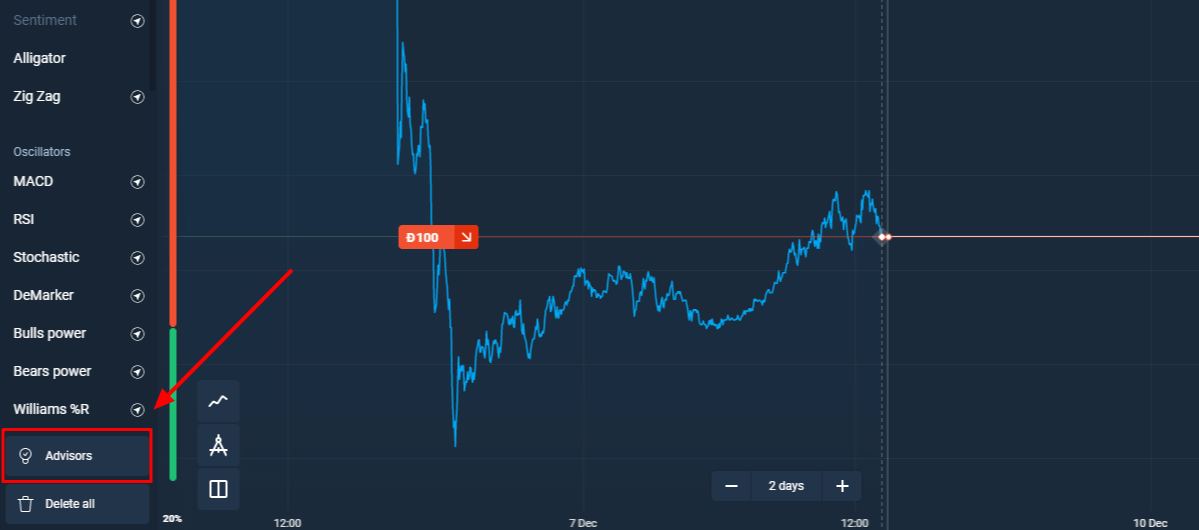
You enter the advisor strategy you want to utilize for a certain asset and the Adviser will help identify when that asset is approaching a Buy or Sell opportunity based on that strategy. Once the advisor notifies you, you decide whether or not to execute a trade. Simple as that – Olymptrade making your life easier.
Which Assets Work with the Olymptrade New Adviser?
Any of the tradable assets on the Olymptrade platform will work the Adviser on either the Forex or the Fixed Time Trading side. The Adviser is designed to help keep you aware of opportunities so that you don’t miss out on potential profits, but you still control whether you enter a trade and for how much you invest.Whichever assets you choose, the Adviser simply tracks the chart behavior based on your specified strategy so it doesn’t matter which assets you prefer. It will work with any of them.
How Does the Adviser Know How to Implement and Track my Strategy?
The Adviser tool is powerful, but it still requires some guidelines to help it function. Olymptrade has paired the Adviser with some of the most powerful trading strategies used by their own professional analysts for identifying entry points for making trades.Therefore, it currently works with three of those strategies that have been entered into its functionality. Fortunately, these are some of the profitable strategies used by professionals and many of the most successful traders on the Olymptrade platform.
The three strategies are the MACD Professional, SMA Intersect, and Predatory Look. Each one uses a different set of techniques for determining entry points for trading positions.
What are the Adviser Strategies and How Do They Work?
There are 3 strategies utilized by the Adviser and each is unique in the way it analyzes market charts. We will give a brief explanation of each, but you can learn more about them in detail on Olymptrade’s YouTube page or online Academy.
MACD Professional
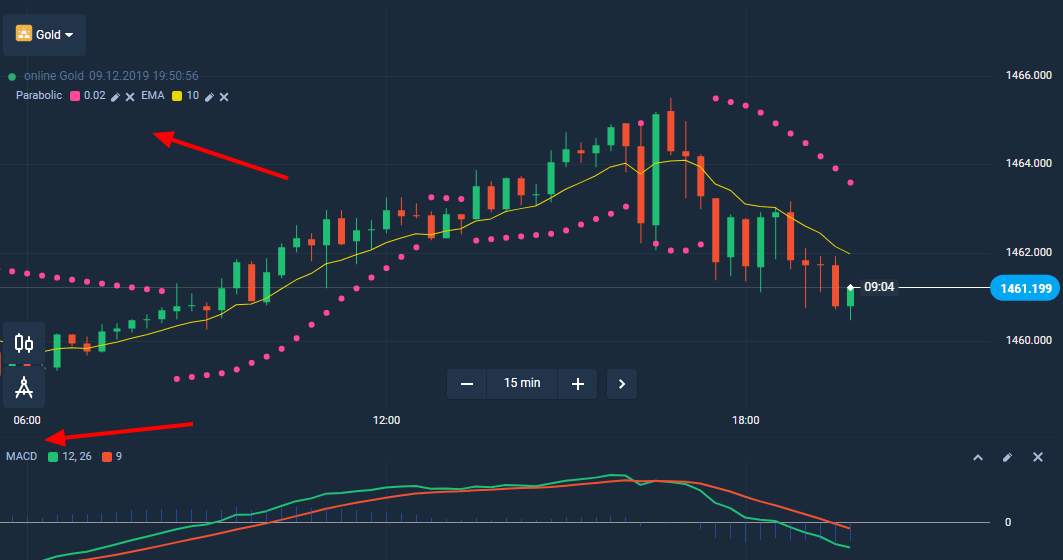
The MACD Professional strategy uses a combination of three different indicators to identify trend reversals of any asset. It uses the MACD, the EMA, and the Parabolic in determining potential entry points on a trend reversal.
Essentially, the MACD and the EMA combine to make the assessment and the Parabolic confirms whether the other two are spot on.
Simple Moving Average Intersect
The Simple Moving Average Intersect (SMA) is a combination of two Simple Moving Averages of different timeframes. The strategy looks for points in a chart where the shorter term SMA “crosses over” the longer term SMA. At these points, an asset begins to trend up or down depending on which way it is heading when it crosses over.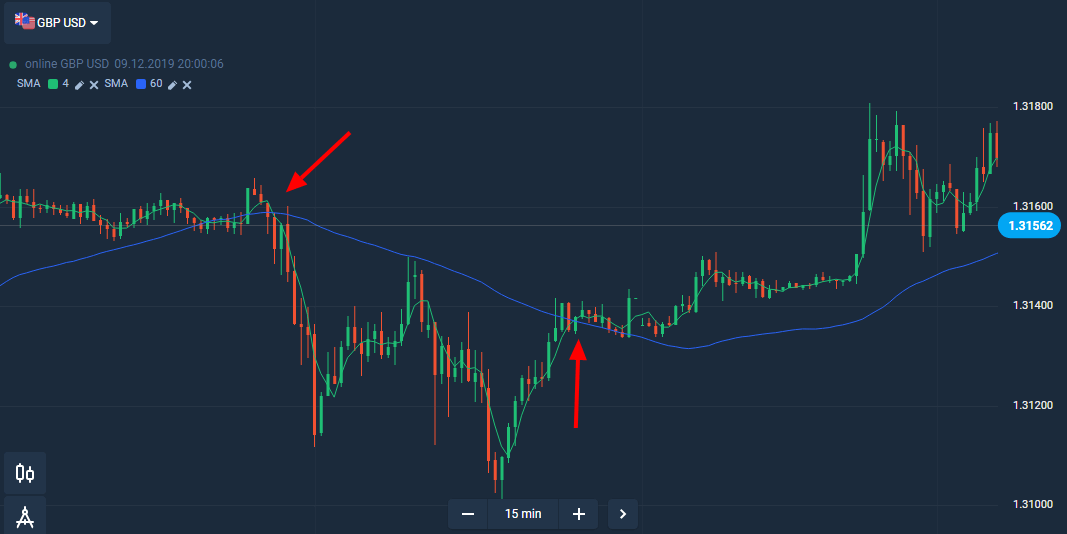
The red arrows show where the shorter term SMA crossed over the longer term. The first arrow indicates a Sell entry point, and the second arrow a Buy entry point. You’ll notice that the market trended down and then up following each of these crosses.
Predatory Look
Stocks often trend sideways, and it becomes increasingly difficult to identify the trend breakouts. The Oscillator strategy uses the upper and lower band values to identify the trend breakouts, which help traders to utilize these early profit-maximization points. Olymptrade advisor program uses two oscillators in conjunction, the Alligator and the awesome oscillator. This strategy helps traders to analyze the overbought or oversold stock conditions in the short-term.Olymptrade users still hold the choice for the trade move, the advisor program works with these successful strategies picked by our experts.
How Do I Know if the Adviser is Working?
Once you have set it up on a certain asset, the Adviser will let you know that it is monitoring the asset and will notify you when a good trading opportunity comes available.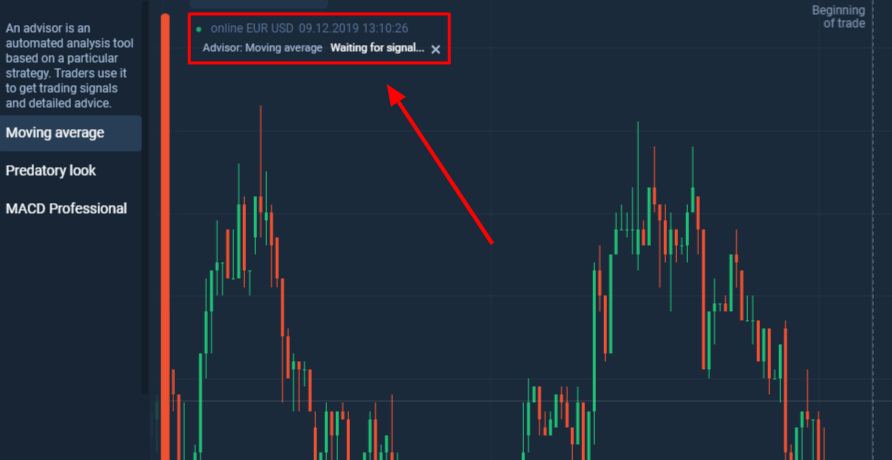
What Do I Do if I Need Help With the Olymptrade New Adviser?
As always, Olymptrade’s excellent customer service team of professionals will be there to assist you with any questions. All the possible forms of service are available to help you including online chats, email, and even phone calls to help get you up and running with the Adviser.Now you know what you need to get started with the Adviser. You’ll soon be on your way to even bigger trading profits with your new automated trading analyst guiding and alerting you on good trading opportunities.
Don’t miss out again on the best trades of the day. Your Adviser and Olymptrade are here to help.
FAQs
Log into your Olymptrade account, open the Advisor Program or Signals section in the dashboard, and follow the on-screen opt-in steps. You may need to complete identity verification and meet any activity or minimum funding conditions listed in the program panel. After enrollment signals are delivered via the in-app feed and notifications; try demo mode first to see how they behave before risking capital.
Check that in-app notifications are enabled and that you’ve completed any required verification or minimum activity conditions. Regional restrictions or maintenance windows can pause deliveries, and personal filters or asset selections may hide alerts. Also verify app permissions, connection status, and that you’re subscribed to the correct signal stream; contact support with timestamps if issues persist.
The program may require identity verification and a minimum account activity or funding threshold to access real-time signals. Demo accounts usually receive sample alerts but some advanced features and live signal streams can be locked until you meet eligibility rules. Review the program terms in your dashboard for exact limits, accepted currencies, and any regional restrictions.
Signals are delivered as platform notifications or feed items and do not require sharing account credentials with third parties. Maintain account security by enabling strong passwords and two-factor authentication, avoid phishing links, and confirm any advisor-related prompts inside the official app only. If a signal provider requests deposits off-platform or asks for login details, stop and report it to support.
Yes, demo accounts typically receive sample signals so you can evaluate timing, execution workflows, and how signals fit your strategy. Use demo testing to check slippage and order placement practices, but remember live conditions can differ, so always apply risk management when switching to real funds.